


Shopping List: My Grocery List
4.91.06K Reviews
App Specs
- Version
- 4.6
- Updated On
- License
- Free
- Downloads
- 100,000+
- Developer
- Komorebi Inc.
- Categories
- Shopping
- Platform
- Android
Screenshots
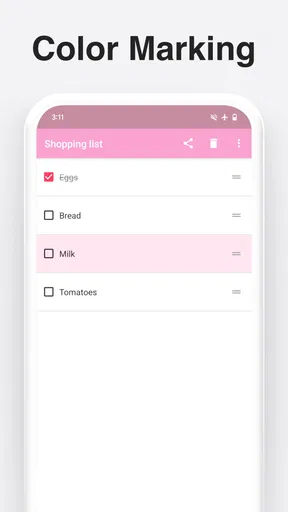
 Analysis by AppCompare
I like a shopping-list app best when it helps me get from “we’re out of a few things” to a finished shop without turning planning into another chore. Shopping List: My Grocery List is aimed at that everyday task: keeping items together, arranging them into lists, and making a shared shop easier to coordinate. It’s free to install, and the first useful result can be as simple as remembering everything for dinner rather than doubling back through the store.
It’s a shopping app from Komorebi Inc., with a 4.9 average from around 11,000 ratings and more than 100,000 installs. It is rated for Everyone, so it’s suitable for a broad audience. Those figures suggest that many people find it useful, but the real question is whether its list-making approach fits the way you shop.
Getting Started with Shopping List: My Grocery List
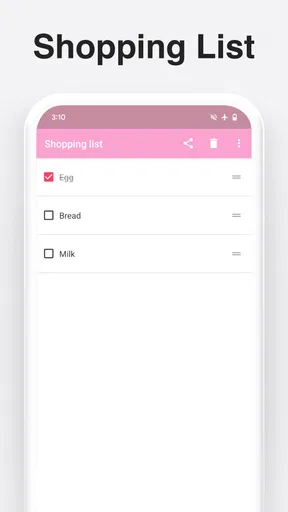
First things first, downloading Shopping List: My Grocery List is a breeze. Whether you're on Android or iOS, it's just a quick search away in the app store. Once you've got it installed, you'll be greeted with a simple, user-friendly interface that's easy on the eyes. I mean, who wants to squint at their phone when they're trying to decide between organic or regular bananas?
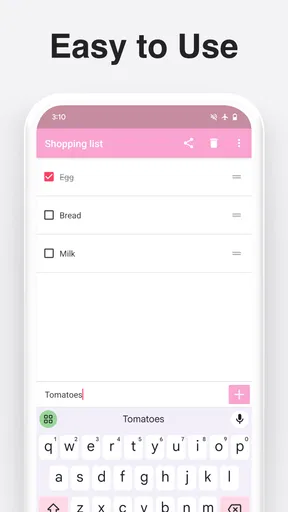
The app allows you to create multiple lists, which is a lifesaver if you’re juggling different shopping trips or even planning a party. You can add items manually or use the voice input feature, which I absolutely love. Just tell your phone "Add milk to the list," and voila, it’s done! It feels like having a personal assistant in your pocket.
Features You’ll Love
One of the standout features is the ability to categorize items. You can organize your list by aisles, which is perfect for breezing through the store without backtracking. Trust me, your feet will thank you.
The app also allows for syncing across devices. This means you can start your list on your tablet at home and continue it on your phone at the store. Plus, if you’re shopping with someone else, you can share lists and update them in real-time. It's teamwork at its finest, without the need for frantic texts or calls.
There’s also a built-in price tracker. You can input the cost of items to keep an eye on your budget. It's a great way to avoid those unpleasant surprises at the checkout counter. I’ve found this particularly helpful when planning meals for the week.
Worth Reading Before You Choose

EA SPORTS FC Mobile 26 Is a Bigger Football Game, but It Takes Time

Flipboard Shows What News Apps Must Do Beyond the Feed

Switching to Android Auto Means Rethinking Your Driving Routine

Google Calendar Makes a Crowded Week Easier to Manage

Ludo King Makes the Most of the Minutes Between Plans

Baby Panda World Brings Quick Play to Modern Phones, but Its Game Library Feels Busy
Making the First Shop Easier
For a first-time user, I’d keep the initial setup deliberately small. Start with one list for the next grocery trip rather than trying to build a perfect household inventory. Add only the items you know you need, then sort them into a useful order for your usual store. That gives you an immediate test of whether the app’s organization suits your routine, without spending your evening setting up a system you may not keep using.
A practical first run might be planning a simple dinner: note the ingredients you’re missing, add a few breakfast staples, and group produce, dairy, and pantry items in a way that matches your route. Before leaving, glance over the list for quantities and easy-to-forget extras such as cooking oil or a side dish. The win is not a beautifully populated app; it is arriving home with what the meal actually needs.
Voice input can help when your hands are busy, but I’d treat it as a quick capture method rather than assuming every spoken item will be entered exactly as intended. Check the list afterward, especially for similar-sounding products or a quantity that matters. A short review at home is easier than discovering a missing ingredient at the store.
Why It Stands Out
What really sets this app apart from the rest is its simplicity and efficiency. It's not bogged down with unnecessary features or ads. Everything is streamlined to make your shopping experience as smooth as possible. It’s like the Swiss Army knife of grocery apps, without all the bells and whistles you don’t need.
The design is clean and modern, making it easy to navigate and use, even if you’re not the most tech-savvy person around. And if you’re anything like me, a well-designed app makes the whole experience much more pleasant.
Keeping Shared Lists Useful
Shared lists are most helpful when the people using them agree on what an item means. “Milk” may be enough for one household, while another needs a particular type or size. I’d add clarifying details where a substitute would cause trouble, and keep routine items named consistently. That small bit of care helps avoid duplicate entries and unnecessary messages while someone is already in the aisle.
For a realistic weekday example, imagine one person notices the household is low on fruit in the morning while another plans to shop after work. Adding the item to the shared list when it comes to mind gives the shopper a single place to check later. If plans change, the person shopping can see the current list rather than relying on an old text thread. The shared workflow is especially useful for recurring essentials, though it still depends on everyone remembering to add changes to the same list.
Multiple lists also make sense when the shopping jobs are genuinely different: a regular grocery run, supplies for a gathering, or a short top-up trip. I wouldn’t split every small errand into its own list, because too many lists can make it less obvious where a new item belongs. A few clear names are easier to manage than a long collection of nearly identical lists.
Budgeting Without Overcomplicating the Shop
The price tracker is useful as a planning aid if you enter prices for items you buy regularly. It can help you notice the likely cost of a planned basket and compare familiar purchases over time. I’d use it as a reminder and estimate, not as a promise of the final checkout total: prices can vary, and a list only reflects the details you choose to enter.
One low-effort way to get value from it is to track a handful of repeat purchases rather than trying to price every item in the store. That keeps the task manageable and makes the information more relevant to a weekly budget. If you rarely buy the same products or don’t want to maintain prices, this feature may add more upkeep than insight; a plain list may be all you need.
Where It Fits Among Shopping Options
Compared with a note-taking app, a dedicated grocery list can make it easier to separate trips, sort items, and share shopping tasks instead of mixing groceries with reminders and unrelated notes. A paper list, meanwhile, needs no phone and can be faster for someone who already writes a few items on the way out. The better choice depends on your habits: this app has a clearer advantage when you want lists available across devices or coordinated with another shopper.
It is also a different kind of tool from a grocery retailer’s app. A retailer app may be a better fit if your main goal is ordering from one store or handling store-specific shopping tasks. This app’s appeal is the list itself, especially when you shop in person or use more than one shop. I would not choose it expecting it to replace every part of online grocery ordering; I’d choose it to make the planning and remembering part less scattered.
Small Frictions Worth Knowing
Any shared list works only if everyone checks and updates it. If one person keeps adding items to a paper note or sending messages instead, the list can quickly become incomplete. Agreeing on one place to record needs is the important habit; the app cannot decide which household system everyone will actually follow.
There is also a balance between helpful organization and too much preparation. Categorizing items can reduce backtracking, but setting up elaborate categories for a quick trip may take longer than shopping from a short, unsorted list. I’d start with the organization that solves a real problem in your store, then add detail only if you find yourself repeatedly walking past items or forgetting a section.
The app is free, though in-app purchases are listed at $7.99 per item. That is worth knowing before you decide how much of your routine to build around it. I’d begin with the basic list-making workflow and consider any purchase only if you encounter a specific need it addresses, rather than paying simply because the option is there.
Who Should Try It—and Who Might Prefer Something Else
I can see this working particularly well for people who shop regularly, split errands with a partner or housemate, or plan meals by collecting ingredients over several days. It is also a sensible choice for anyone who often remembers groceries at inconvenient moments and wants a shared place to capture them. With a current version of 4.6 and support for operating systems from version 9 onward, it is worth checking that your device meets the requirement before installing.
On the other hand, if your needs are only one or two items at a time, a paper scrap or the phone’s built-in notes may feel quicker. If you want detailed meal planning, store ordering, or a broader household-management system, a specialized alternative may suit you better. I’d also skip a shared setup if the other shoppers won’t use it consistently; a tool is only convenient when it matches the group’s habits.
Final Thoughts
To sum it up, Shopping List: My Grocery List is a must-have app for anyone looking to make grocery shopping less of a chore. It's practical, easy to use, and full of features that genuinely make life easier. Whether you’re a seasoned chef or someone who dreads the grocery store, this app is a game-changer.
So, next time you’re prepping for a shopping trip, give this app a try. You might just find that your trips are quicker, more organized, and dare I say, enjoyable. Happy shopping!
Pros
- Easy to use interface for quick list creation.
- Syncs across devices for shared access.
- Customizable categories for organization.
- Barcode scanner for easy item addition.
- Voice input feature for hands-free use.
Cons
- Ads can be intrusive at times.
- Limited features in free version.
- Occasional syncing delays.
- No offline mode available.
- Requires account for full functionality.
FAQs for Shopping List: My Grocery List
What features does Shopping List: My Grocery List offer?
Shopping List: My Grocery List provides an intuitive interface for creating and managing grocery lists. Features include categorizing items, syncing across devices, voice input for quick additions, and sharing lists with others. The app also offers barcode scanning for easy product entry and personalized item suggestions based on your shopping habits.
Is Shopping List: My Grocery List free to use?
Yes, Shopping List: My Grocery List offers a free version with basic features. However, there is a premium version available for users who want additional features like ad-free experience, advanced list management tools, and enhanced syncing options. The premium version is available via in-app purchases.
How does syncing work in Shopping List: My Grocery List?
The app allows you to sync your grocery lists across multiple devices, ensuring you always have access to your latest list. This is especially useful for families or roommates sharing shopping responsibilities. Syncing requires an account and an internet connection, and can be easily managed through the app’s settings.
Can I share my lists with others using the app?
Yes, Shopping List: My Grocery List makes it easy to share your lists with family and friends. You can invite others to view or edit your lists, making collaborative shopping a breeze. Sharing works through email or direct app invites, ensuring everyone is on the same page when it comes to groceries.
What kind of support is available if I encounter issues with the app?
Shopping List: My Grocery List offers comprehensive support options, including an in-app help section, FAQs, and customer support via email. Users can also access community forums for tips and advice from other users. The app regularly updates to fix bugs and improve user experience, ensuring smooth functionality.


